

About This Item
Description
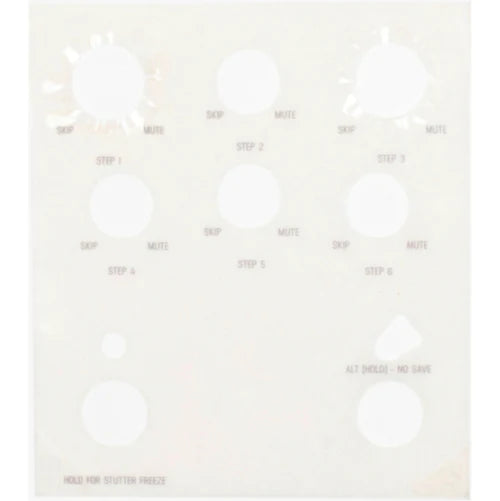
This clear vinyl overlay labels the hidden Alt-layer functions on your Ottobit Jr.'s knobs directly on the pedal face, so you can read the second parameter at a glance without memorizing it.
What it does
Each Ottobit Jr. knob does double duty: a primary function on a normal turn, and a second, Alt-layer function accessed by holding the pedal's ALT (Tap/Alt) switch — on Ottobit Jr. the Alt layer sets the six sequencer steps. This overlay is a clear, soft vinyl cling that sits over the control panel and prints the Alt-layer name next to every knob, along with the pedal's global parameters, so the hidden settings are always visible instead of memorized.
Alt functions shown
- Sample Rate — Step 1
- Filter — Step 2
- Bits — Step 3
- Stutter — Step 4
- Sequencer Play Mode — Step 5
- Sequencer Multiply — Step 6
Compatibility
Made specifically for the Meris Ottobit Jr. bitcrusher. Meris offers Alt Function Overlays only for its five compact pedals — Enzo, Hedra, Mercury7, Ottobit Jr. and Polymoon. They are not made for LVX, MercuryX, Enzo X or Ottobit X, which use on-screen menus instead of an Alt knob layer.
Why players choose it
- Clear, soft, thin vinyl construction (v2 revision)
- No adhesive — applies instantly by static cling and lifts off cleanly, without residue
- Printed and made in Massachusetts, USA
In the Box
- One Ottobit Jr.-specific overlay
| Product | Meris Alt Function Overlay v2 |
|---|---|
| Fits | Meris Ottobit Jr. |
| Material | Clear, soft, thin vinyl |
| Attachment | Static cling, no adhesive |
| Shows | Alt functions (sequencer Steps 1–6) of all six knobs and global parameters |
| Made in | Massachusetts, USA |
FAQ
Which pedal is this overlay made for? The Meris Ottobit Jr. only. Separate overlays are made for Enzo, Hedra, Mercury7 and Polymoon.
Does it use adhesive? No. It applies instantly by static cling and can be removed and repositioned without leaving residue.
What is it made of? Clear, soft, thin vinyl that removes cleanly with no adhesive residue.
What does it show? Which sequencer step (1–6) each knob sets on the Alt layer, plus the pedal's global parameters.
How do I program the sequencer steps on Ottobit Jr.? Hold the ALT (Tap/Alt) switch and turn each knob to set the value of its step; the overlay shows which knob is which step.
Does it fit Ottobit X or other X-series pedals? No. Overlays are offered only for the five compact two-footswitch pedals (Enzo, Hedra, Mercury7, Ottobit Jr., Polymoon).